
(Disclaimer: As an Amazon Associate, PlayingAround4Now earns from qualifying purchases made through the affiliate links below. Thank you for supporting the site!)
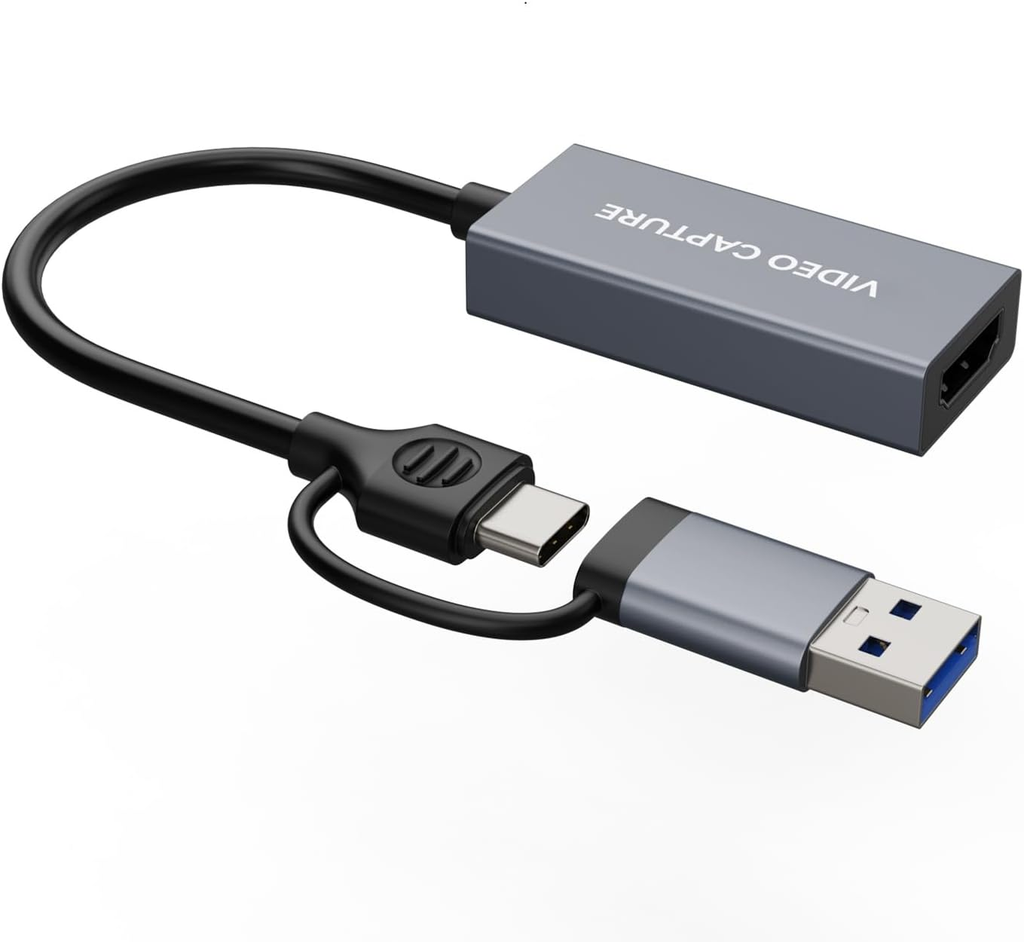
EZcap Video Capture Card Review: The Best Budget Capture Card?
If you have been thinking about diving into the world of live streaming or content creation, you are likely wondering how to capture your console gameplay without breaking the bank. Today, we’re checking out the EZcap Video Capture Card.
This compact device promises to make capturing your favorite games easier than ever. But does it deliver the quality you need to grow your channel? In this EZcap Video Capture Card review, we will break down its features, test its setup process, and see if it is truly the best cheap capture card on the market right now. If you are still exploring all of your hardware options, be sure to check out our complete guide: Ranking 18 Capture Cards: Which One Should You Actually Buy?
Table of Contents
🌟 Hands-On with the EZcap Video Capture Card
If you want to see exactly how this device looks running live in action, click the video above! I walk through the entire physical setup, demonstrate the gameplay capture quality, and show you exactly what to expect when you take it out of the box.
If you are ready to pick one up for yourself and start streaming, you can grab it right here: 👉 https://amzn.to/3Uxsl5O
🎮 What is the EZcap Video Capture Card?
When you are just starting your streaming journey, massive internal capture cards can be intimidating and expensive. The EZcap Video Capture Card is designed to solve that problem.
It is a remarkably simple, straightforward USB plug-and-play capture card. It acts as the middleman between your gaming console and your PC, taking the video and audio signals from your games and translating them so your streaming software can read them. Despite its small, flash-drive-like size, it packs enough power to handle modern gaming demands without bogging down your system.
It is highly versatile and fully compatible with the PS5, Xbox Series X|S, the Nintendo Switch (and Switch 2!), standard PCs, and even DSLR cameras if you want to upgrade your facecam quality.
⚡ Key Features and Capture Quality
For a budget-friendly device, the EZcap Video Capture Card punches well above its weight class when it comes to visual fidelity.
4K 60 Input Support You do not have to sacrifice your own gaming experience just to stream. The device supports a 4K 60 frames per second input. This means you can play your games on your main television or monitor in stunning 4K while the capture card works in the background.
1080p 60fps Capture While it takes in a 4K signal, it captures and outputs the video to your streaming software at a rock-solid 1080p at 60 frames per second. This is the absolute golden standard for Twitch and YouTube streaming. It also supports 2K capture at 30 frames per second if you prefer a higher resolution for recorded YouTube videos.
Ultra-Low Latency Latency is the delay between what happens on your console and when it appears in your streaming software. The EZcap Video Capture Card operates at an ultra-low latency, meaning your gameplay and your live commentary will remain perfectly synced for your viewers.
🔌 Easy Plug-and-Play Setup
The biggest selling point of the EZcap Video Capture Card is how incredibly easy it is to set up. There are no complicated internal installations or frustrating driver downloads required.
Here is exactly how I set it up using my Nintendo Switch 2:
- Connect the Console: Take the HDMI cable that is plugged into your console (like your Switch 2, PS5, or Xbox) and plug it directly into the HDMI port on the EZcap dongle.
- Connect to the PC: Take the USB end of the EZcap dongle and plug it into an available USB slot on your PC or laptop.
- Add to Software: Open your chosen streaming software, add a new “Video Capture Device” source, and select the EZcap from the drop-down menu.
That is literally it. Within seconds, you have live gameplay running directly on your PC screen, ready to be broadcast to the world.
💻 Software Compatibility
You don’t have to worry about this device locking you into proprietary, clunky software. The EZcap Video Capture Card plays nicely with all the major third-party platforms you already use.
It seamlessly integrates with:
- OBS Studio (The industry standard for live streaming)
- Twitch Studio
- YouTube Live
- Zoom (Perfect if you are using it to connect a DSLR camera for high-end video calls)
🏆 Final Verdict
Altogether, I feel like the EZcap Video Capture Card is an absolutely fantastic device for people who are just starting off their streaming or content creation journey.
If you want a simple, straightforward plug-and-play capture card that delivers reliable 1080p 60fps quality without the headache of a complex setup, this is a must-buy. It gets the job done efficiently so you can focus on what actually matters: entertaining your chat and creating great content.
👉 Visit my Amazon Influencer Store Here to purchase the EZcap Video Capture Card: https://amzn.to/4xEhA0e
Have you tried using a USB capture card for your streams yet? Let me know what you think of the EZcap in the comments below!
Pingback: Call of Duty Modern Warfare 4 PS5 Pre-Order